
Overview
Pearl Diver's Beeswax integration lets you sync your Pearl Diver audiences directly to Beeswax as segments, ready for activation in your DSP campaigns. Once connected, Pearl Diver sends emails and mobile advertising IDs (MAIDs) from your audiences into Beeswax, keeping your targeting data up to date.
✅ Prerequisites
Before setting up the integration, make sure you have the following from your Beeswax account:
- Email - the login email for your Beeswax account
- Password - your Beeswax account password
- Buzz key - your Beeswax account's
buzz_key, used to identify your account via the API. You can find it in your Beeswax URL:https://<your-buzz-key>.beeswax.com
ℹ️ Your Beeswax account must have segment-write permissions enabled. If you’re unsure, check with your Beeswax account manager.
🛠️ Setup Steps
1. Navigate to Actions
Go to the Actions page in Pearl Diver and click on the Beeswax action to open the integration configuration screen.
2. Enter Your Credentials
Enter the following details on the Action configuration card of Beeswax:
- Buzzkey
- Password
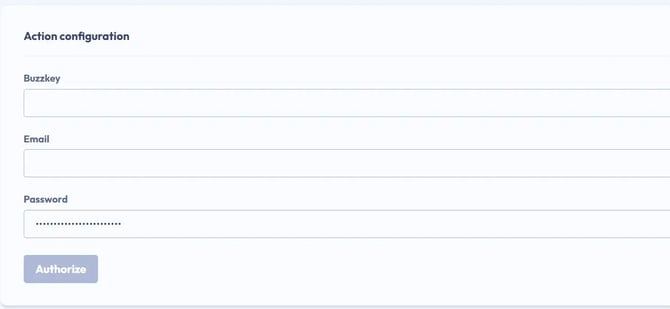
After filling out the fields, click Authorize to validate.
Pearl Diver will validate these credentials against the Beeswax API. You'll see a confirmation once the connection is successful.
🔐 Your credentials are encrypted and stored securely. Pear Diver does not expose them after saving.
3. Add Audience Configuration
Once authorized, you can configure which audiences from Pearl Diver should export their data to the Beeswax segment.
- Under Audience Configuration, select one or more audiences to connect.
- Click Update to save the configuration.
Segments created by Pearl Diver within Beeswax will use your internal audience name on the Beeswax side, combined with either the default prefix (“PDV”) or your audience branding prefix set within your organisations settings (e.g. “MYOB | My Audience”).
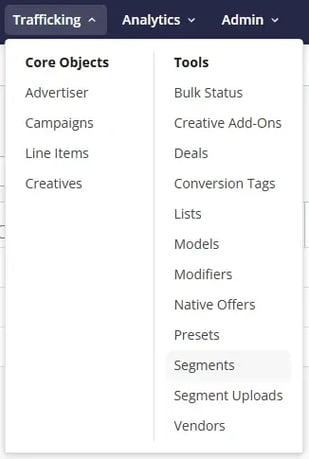
🔍 How to find synced audiences in Beeswax
Synced audiences (i.e. Segments) can be found under Trafficking → Tools → Segment Uploads and the segments themselves, created to match your Pearl Diver audiences.
⚡️ How sync works
Pearl Diver sends audience data to Beeswax using the segment_upload API in batches of up to 1,000,000 records at a time.
| Limitation | Detail |
| Only HEM and MAID records currently supported | Only email and MAID properties of the contact record are included in the segment sync at this time. |
| Single account | One Beeswax account per tenant. |
| Add only | Members are added to segments. Automated removal (e.g. for GDPR opt-outs) is not yet supported. |
❓Troubleshooting
| Issue | What to do |
| Connection failed | Double-check your email, password, and buzz_key. Ensure your Beeswax user has segment-write permissions. |
| Segment contains zero synced records | Confirm your audience records contain at least email (Main and/or Personal) and/or MAID properties. Cookie ID, UID2, RampID and other identity solutions are not supported at this time. Beeswax also has a built in delay when reconciling records from uploads with the segments themselves, so wait ~6-24 hours and check again. |
| Session expired | Re-enter your credentials in the Beeswax card on the Actions page. |
| Can't find your buzz key | Log in to Beeswax and check your browser URL - it follows the format https://<your-buzz-key>.beeswax.com. |